

WordPress Object Caching: What It Is and When to Use It
Your homepage can feel fast while the parts that make money still feel slow. If you’re trying to speed up your website, it helps to understand that not every request behaves the…
Read

PageSpeed’s “reduce initial server response time” warning can make a normal WordPress speed problem feel bigger than it is. If your report says WordPress TTFB very slow, the browser is waiting too long before it receives the first piece of the page.
That sounds like a hosting problem, and sometimes it is. But I wouldn’t start by changing hosts or adding another cache plugin. I’d start with one question: which request is waiting?
TL;DR: Test a logged-out public page first. If that page is slow, check full-page HTML cache, CDN behavior, and redirects. If checkout, account pages, search, wp-admin, or logged-in views are slow, look at the work WordPress has to do for that request.
A cached blog post, a WooCommerce checkout, and a WordPress admin page can all show bad TTFB for different reasons. Treat them as the same problem, and you’ll waste time on fixes that were never going to help.
| What you see | Check first |
|---|---|
| Logged-out public pages are slow everywhere | Page cache, HTML CDN cache, origin server, redirects |
| First view is slow, but the repeat view is fast | Cold cache, cache warmup, CDN MISS to HIT behavior |
| Faraway locations are slow, nearby tests are fine | CDN HTML caching, server region, routing |
| The homepage is fast, but checkout or admin is slow | PHP workers, database, object cache, plugins |
| Static files are fast but document TTFB is high | HTML is uncached or WordPress is slow |
| Lab result improved but field data still looks bad | Field data lag, different users, older visits |
| TTFB spikes during traffic bursts | Cache misses, worker limits, database load, server resources |
TTFB is Time to First Byte. It measures how long a URL sits unanswered before the browser gets anything back at all.
For a normal WordPress page, that first byte usually starts the HTML document. If the HTML starts late, the whole page starts late. That is why slow TTFB can lower LCP too: the browser cannot render the main content until the document begins.
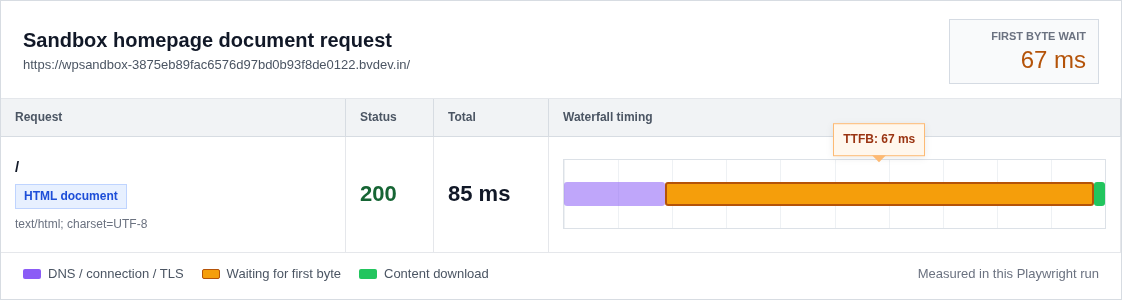
The trap is assuming that the whole wait belongs to the web server. It can include:
So when PageSpeed says the initial server response is slow, don’t treat that as a finished diagnosis. Treat it as a clue that one part of the trip is holding the page up. The number proves there is a delay. The request path points to the layer worth fixing.
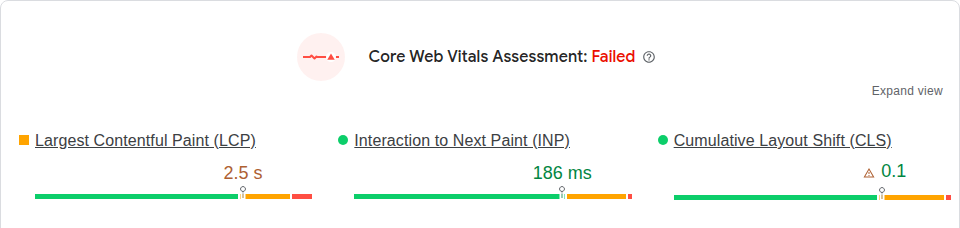
Use 0.8 seconds or less at the 75th percentile as the main benchmark. In simple terms, most real visits should get the first byte in 800ms or less. I read the number by page type:
| Page type | What the number usually means |
|---|---|
| Cached public page | A few hundred milliseconds is realistic on a strong setup |
| Public page far from the server | Higher can be normal, but it should improve when HTML is cached near visitors |
| Uncached WordPress page | Slower is expected because WordPress has to build the page |
| Cart, checkout, account, admin, logged-in pages | Judge separately because these often skip the full-page cache on purpose |
Don’t chase the same tiny number for every URL. That is how carts break, private pages get cached, and good hosts get blamed for pages that were never meant to behave like a cached blog post.
Pick one public page that a normal visitor can see while logged out. A homepage, landing page, or blog post works.
Then pick one page that needs fresh or personal data. For a store, checkout is usually the clearest test. For another site, use an account page, search results, or wp-admin. Keep this result away from the public-page result, because these URLs often have different cache rules on purpose.
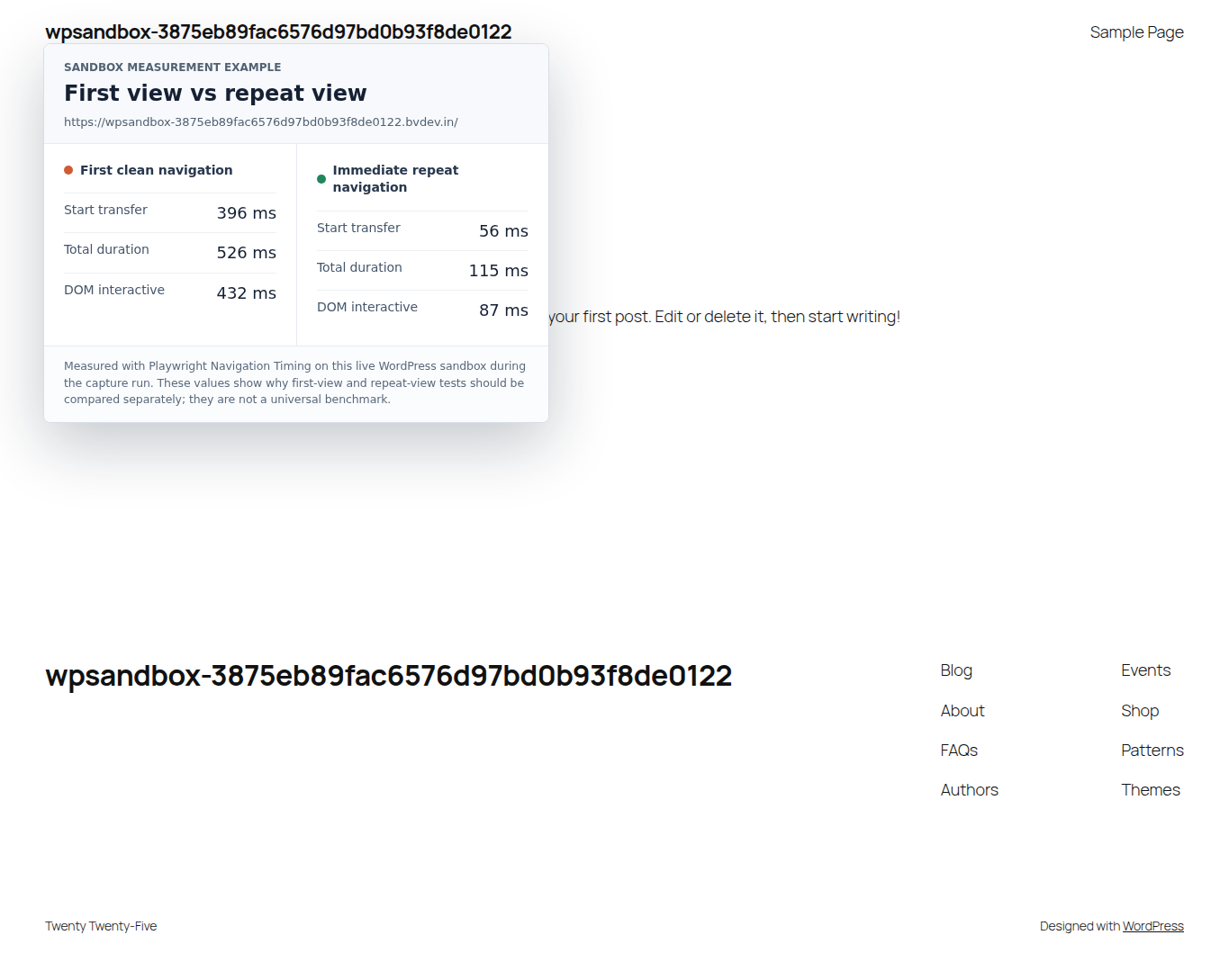
Run both tests from one location. Keep the URL and login state consistent. If your tool supports it, run a first-view and repeat-view test. The first view may show a cold cache, which means the saved version was not ready yet. The repeat view may be faster because the cache or connection has warmed up.
🧭 Note: If you’re logged into WordPress while testing, full-page cache may be skipped. That doesn’t prove visitors have slow TTFB. It proves your admin session is a different kind of request.
Use PageSpeed Insights for a quick lab result plus real-user field data. Use WebPageTest when you need the waterfall, which is the list of requests and waits in loading order. GTmetrix gives a friendlier view of the same issue.
When a logged-out public page has very slow TTFB, check page cache first. Page cache keeps a ready-made HTML copy. When it works, WordPress doesn’t rebuild that page for every visitor. The server can send the saved copy much sooner.
Confirm whether the HTML document is cached before you tune smaller things. Images, fonts, and scripts can be fast while the main page document still goes all the way back to WordPress.
Look at the document request in your speed tool or browser network panel. If your host or CDN shows a cache status, these words matter:
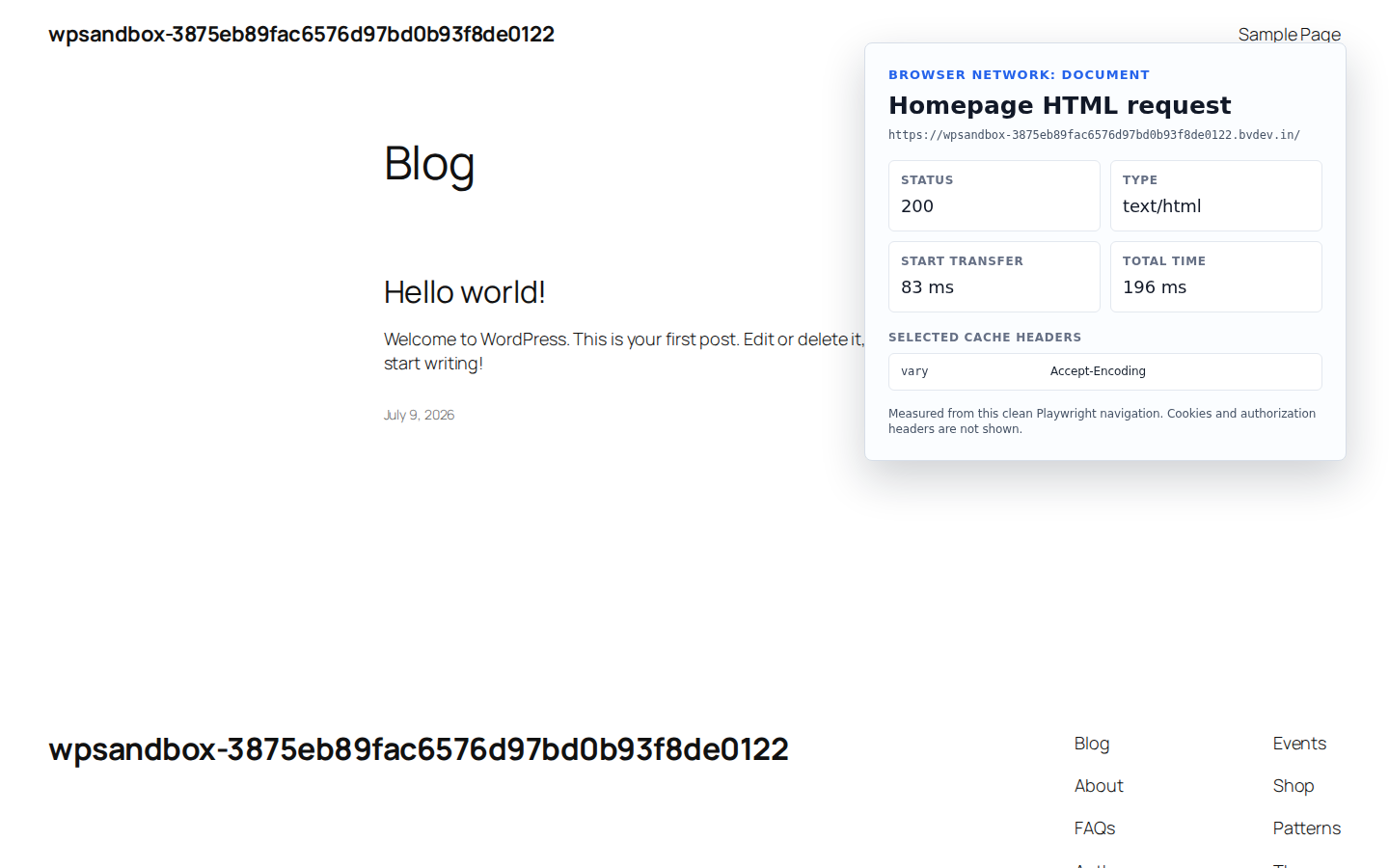
The usual causes are plain, but easy to miss:
⚠️ Note: Make a fresh backup before you edit cache rules. Cache changes can usually be undone, but checkout, cart, account, and membership pages need extra care because they can contain personal data.
A CDN puts files near the people visiting your site. That can help TTFB, but only when the HTML document benefits. Many CDNs speed up images and scripts by default, while the page document still travels back to your main server.
So don’t stop at “we use Cloudflare” or “we have a CDN.” Open the waterfall and inspect the page document. If the document is a MISS or BYPASS, your CDN may help static files while WordPress still handles the page.
Edge HTML cache keeps a finished page document closer to visitors. It can be excellent for public pages. It needs careful rules for logged-in users, cookies, carts, account pages, and other personalized views.
🌍 Note: If only faraway visitors see slow TTFB, the server region may be part of the issue. A CDN can reduce that distance for cached HTML, but it can’t make an uncached checkout page behave like a static page.
If the homepage is fast but checkout, search, account pages, or wp-admin is slow, stop tuning public page cache for a moment. These pages often skip full-page cache because the content has to be fresh or personal.
Now you need server-side evidence. A front-end speed report can tell you the browser waited. It can’t tell you which plugin, query, or server limit caused the wait.
Ask the person who manages the server to profile one slow request. Profiling means timing what happens inside WordPress and the server while that exact page loads. You want to know whether time is going into:
Object caching can help stores, memberships, dashboards, product filters, and search pages because those requests often reuse the same database results. It is not a replacement for page caching, and it won’t fix bad plugin code. On a small site where almost every visitor gets a cached public page, object caching may barely move TTFB.
Hosting can absolutely be the reason WordPress TTFB is very slow. I just don’t like making it the first guess, because moving hosts is expensive and often hides a simpler cache mistake. Once you know which URLs are slow, the hosting questions get sharper:
Redirects belong here too. They add time before the final page even starts. HTTP to HTTPS and non-www to www are common places to start. Old plugin rules, mobile redirects, and language redirects can add their own delay too.
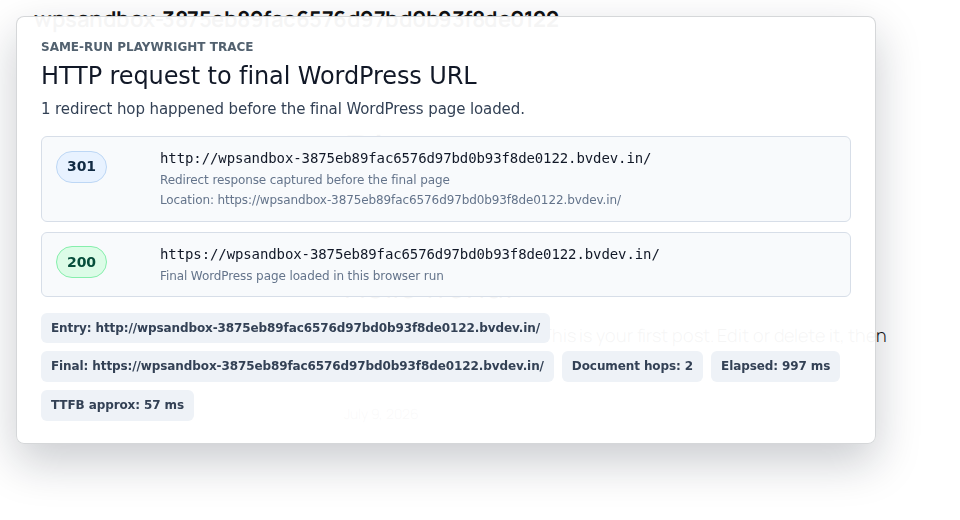
Fix redirect chains before judging the final page’s TTFB. Otherwise, you’re timing the trip before the page and blaming the page itself.
If this were my site, I’d work through the problem like this:
AirLift fits the visitor-facing part of this work: page caching, CDN delivery, image handling, and the wider Core Web Vitals layer. I would not use it as a cure for slow checkout queries, exhausted PHP workers, or a hosting plan that has run out of room. Use it where caching and front-end performance belong, then get host or developer evidence for dynamic pages.
💡 Note: Retest after each change and write down the result. If cache rules, CDN settings, PHP version, and image settings all change together, you won’t know which fix helped or which change caused trouble.
Support can do more with specifics than with “my site is slow.” You don’t need server language. You need clean evidence.
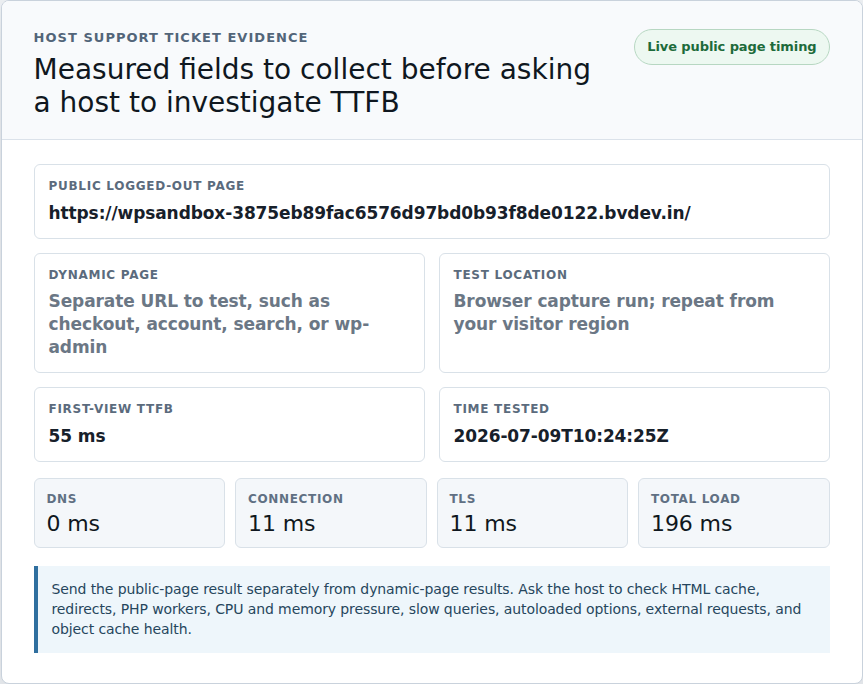
Send this:
We’re seeing slow TTFB / initial server response time on these URLs:
Public logged-out page:
Dynamic page:
Test location:
First-view TTFB:
Repeat-view TTFB:
Time tested:Can you check whether the public logged-out page is being served from full-page HTML cache?
Can you also check redirects, PHP worker usage, CPU and memory pressure, slow database queries, autoloaded option size, external requests during page generation, and object cache health?
That ticket makes it harder for the answer to stop at “install a cache plugin.” Maybe cache is the fix. But if the slow URL is checkout or wp-admin, you want the conversation to move into the right layer quickly.
Your WordPress TTFB is very slow because the page document takes too long to start arriving. The cause may be a missed page cache, CDN pass-through, redirects, hosting limits, slow database work, plugin code, or a page that needs a fresh response.
A good baseline is 0.8 seconds or less for most real visits. Cached public pages may land well below that. Checkout, account, admin, and other uncached pages can be slower because WordPress has to build a fresh response.
Yes, if the slow URL is a public page that can safely be cached. A cache plugin can serve saved HTML to logged-out visitors. It won’t fix slow checkout logic, overloaded PHP workers, bad database queries, or a server that is out of resources.
Your CDN may be caching images and scripts while the HTML document still comes from your origin server. Inspect the page document in the waterfall. If it shows MISS or BYPASS, the CDN is probably not reducing HTML TTFB for that page.
Object caching can reduce TTFB on dynamic or database-heavy pages by saving reusable database results. It helps most when WordPress keeps asking for the same data during store, membership, dashboard, or search requests. It does not replace full-page cache for public pages.
When WordPress TTFB is very slow, don’t start with random speed tweaks. Start by separating the request. A cached public page is one case. Checkout or wp-admin is another. A CDN miss and a redirect chain need their own checks too.
Take a backup, test one logged-out public page, test one dynamic page, and change only one thing before you retest. The goal is not one lucky green score. The goal is knowing which wait you removed, so the next fix is based on evidence instead of panic.
Your homepage can feel fast while the parts that make money still feel slow. If you’re trying to speed up your website, it helps to understand that not every request behaves the…
Read

Is your WordPress website loading slowly, but you are not sure what is causing the problem? Changing plugins, hosting, themes, or cache settings without clear evidence can waste…
Read

Nothing in a WordPress slow server response time warning tells you what actually went wrong. “The server” could mean WordPress missed the cache. It could mean PHP got stuck, the…
Read
Airlift works out what each page needs and applies it. Free to try on your own site.