

Redis Object Cache for WordPress: What It Does and When You Need It
Redis object cache sounds like one of those WordPress speed fixes you should just turn on and forget about. I get the appeal. When a site is slow, nobody wants a lecture about…
Read

Sometimes a WordPress site is slow, but not for everyone.
It loads fine for you. Then a customer in another country says the images take forever. A speed test from your city looks okay, but a test from London, Singapore, or Sydney looks rough. That is usually when a site owner starts looking for a WordPress CDN.
A CDN can help, but only when the problem is delivery. It will not rescue weak hosting, bloated plugins, oversized images, slow database work, or a theme that loads too much code.
TL;DR: A WordPress CDN speeds up your site by serving cached files, and sometimes full pages, from servers closer to your visitors. It helps most for global, image-heavy, or high-traffic sites, but it will not fix slow hosting, bloated plugins, database issues, or low disk space by itself.
Use a CDN when distance, traffic spikes, bandwidth, static files, or edge security are part of the problem. Fix WordPress performance when the slowdown comes from your server, theme, plugins, images, JavaScript, CSS, or database.
Before you choose one, measure your website speed from the regions your visitors use. Most strong setups use both: a CDN for delivery and WordPress optimization for the site itself.
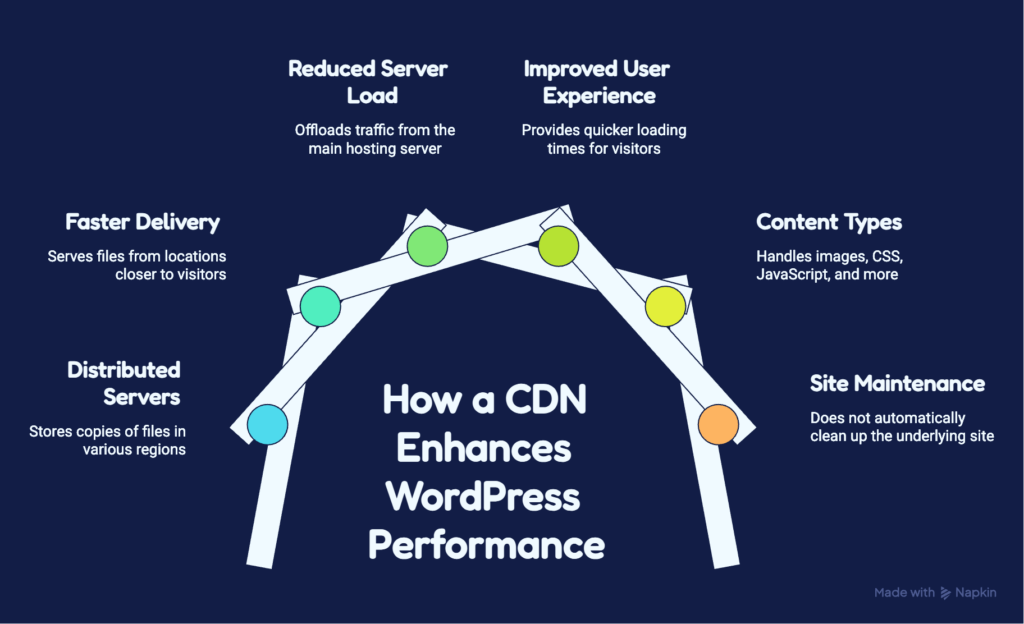
A WordPress CDN is a content delivery network connected to your WordPress site. It stores copies of safe-to-cache files on servers in different regions, then serves those files from a location closer to each visitor. For most WordPress sites, a CDN handles:
Your WordPress site still lives on your hosting server. WordPress core, PHP, the database, the admin area, plugin logic, and original media files stay there unless you use a separate storage service.
That point matters. A CDN improves delivery. It does not automatically clean up the site underneath.
CDN language gets noisy, but a few terms are enough for most decisions.
| Term | Meaning | Why it matters |
|---|---|---|
| Origin | Your main hosting server | A slow origin still limits results |
| Edge server | A CDN server near visitors | Shorter distance can mean faster delivery |
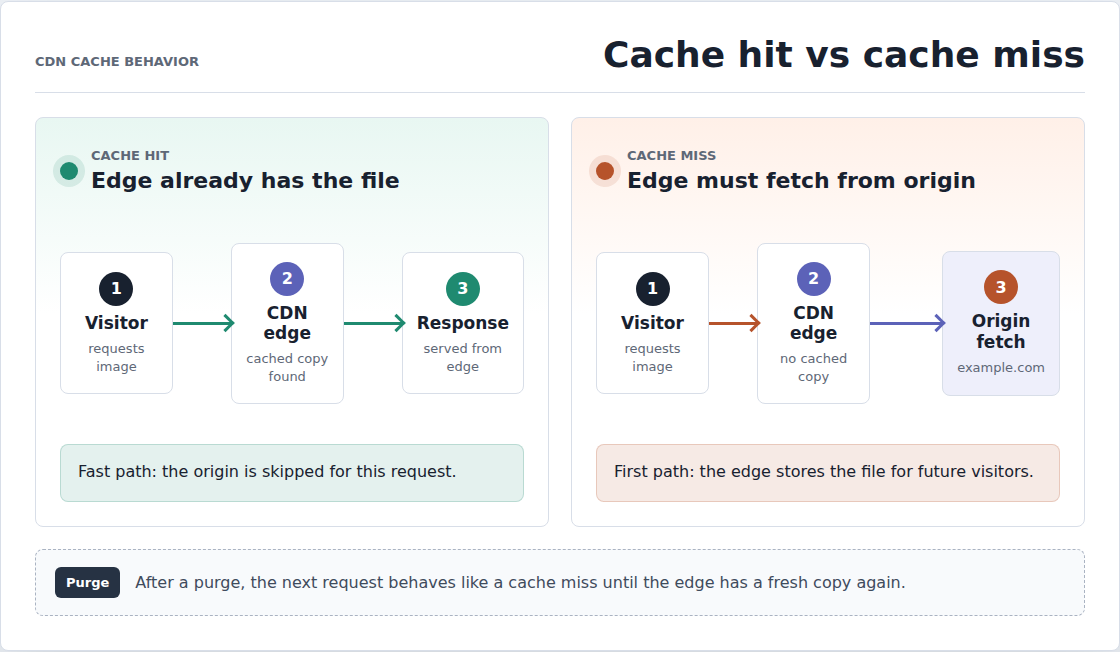
| Cache hit | The CDN already has the file | This is the fast path |
| Cache miss | The CDN must fetch the file first | First requests can still be slower |
| Purge | Clear cached content | Needed after edits or broken cached files |
| Static CDN | Caches files like images, CSS, and JS | Safest common starting point |
| Full-page CDN | Caches whole pages | Fast, but risky without rules |
The important part is not the vocabulary. The important part is knowing what can be cached safely.
Without a CDN, the visitor’s browser requests the page and files from your WordPress host. If the visitor is far from that host, every request has farther to travel.
With a CDN, the browser reaches the CDN first for eligible content. If the CDN has a cached copy, it serves it. If not, it fetches the file from your host, stores a copy, and serves it to the visitor. Future visitors in that region usually get the faster cached version.
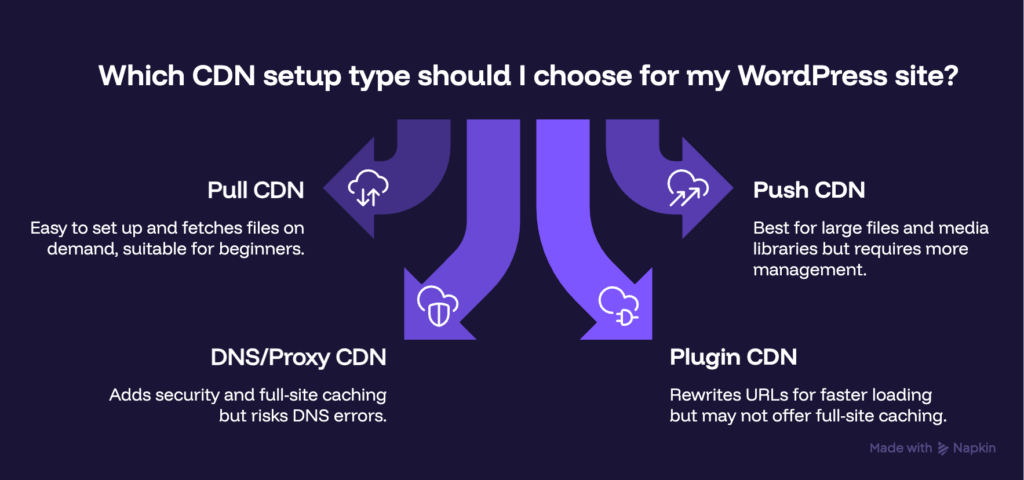
There are a few common setup types:
If you are new to CDNs, start with the least complex setup that solves the problem. A static asset CDN is easier to test and undo than full-page edge caching.
A CDN helps most when delivery is the bottleneck. That sounds obvious, but it saves money and cleanup time. Use a CDN when:
A CDN can improve page speed, TTFB, LCP, and overall load time when slow delivery is part of the problem. TTFB means time to first byte, or how long the browser waits before the first response starts. LCP means largest contentful paint, or how long the main visible content takes to load.
Do not treat those metrics as automatic SEO wins. Faster pages help user experience and can support Core Web Vitals, but rankings also depend on content quality, relevance, trust, and many other signals.
This is where many CDN decisions go wrong.
A CDN is good at moving cacheable content closer to visitors. It is not good at hiding a slow WordPress setup.
| Problem | Will a CDN fix it? | Better move |
|---|---|---|
| Global visitors wait on distant files | Usually | Use a CDN and test by region |
| Huge original images | Partly | Resize and compress images first |
| Hosting storage is full | No | Clean media, backups, or use media offload |
| WordPress admin is slow | Usually no | Check hosting, PHP, database, cron, plugins |
| Checkout is slow | Be careful | Optimize WooCommerce and exclude dynamic pages |
| Theme loads too much CSS or JS | Not enough | Remove, defer, or optimize unused assets |
| Database queries are slow | No | Audit plugins, queries, hosting, and object cache |
| Core Web Vitals are poor | Sometimes | Use broader WordPress performance work too |
A CDN is also not a cache plugin. A cache plugin works inside WordPress or hosting. A CDN works at the delivery layer. They can work together, but duplicate cache layers can create stale pages, purge confusion, and hard-to-find bugs.
A CDN is not media storage either. If disk space is the problem, you need media cleanup, backup cleanup, or media offload. A basic CDN keeps copies for delivery, but the original files still live on your server.
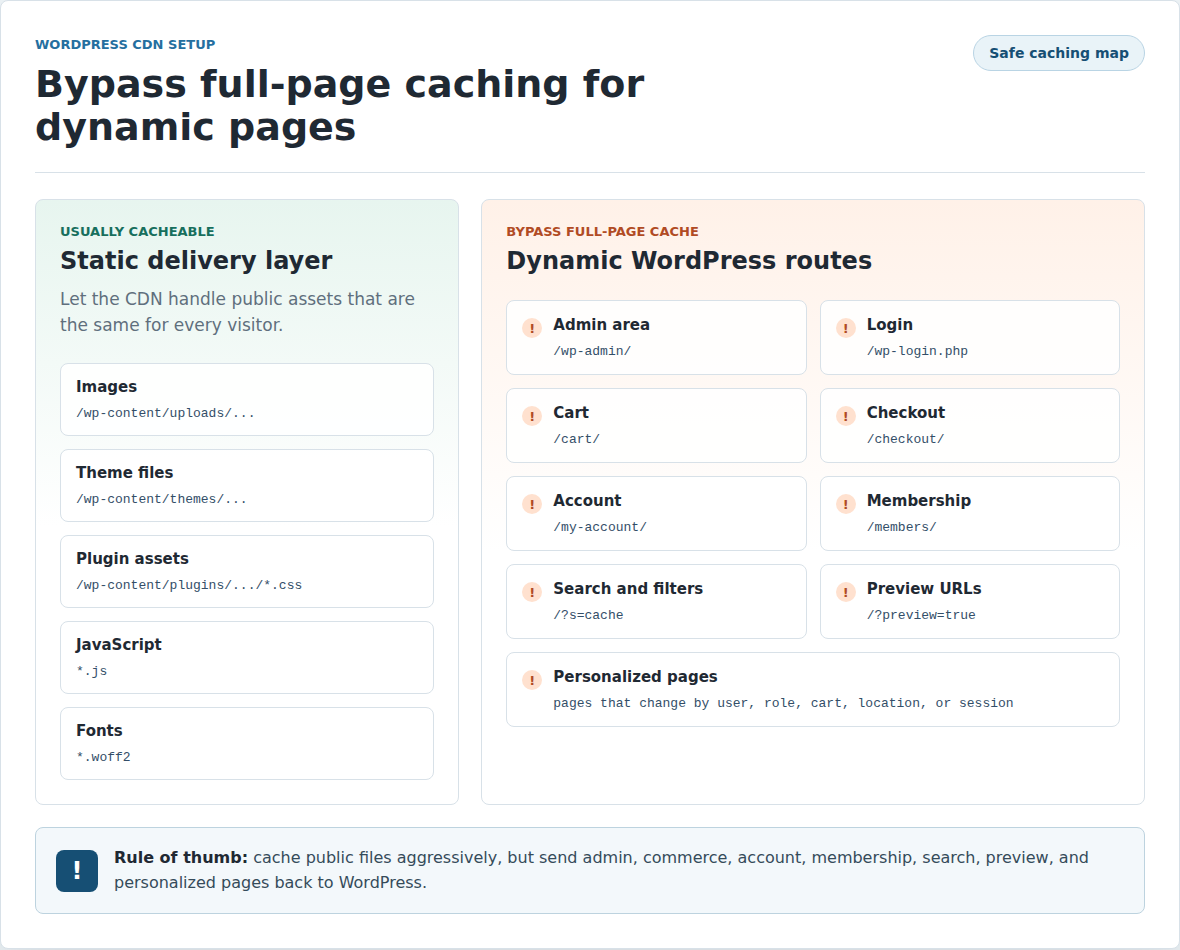
Full-page CDN caching needs the most care. Do not blindly cache admin, login, cart, checkout, account, membership, search, preview, or personalized pages. If a page changes for each user, treat it as sensitive.
This is also where AirLift fits. A CDN can speed up delivery, while AirLift helps with the WordPress-side performance work a CDN cannot solve on its own. Use a WordPress performance optimization plugin for heavy pages, Core Web Vitals issues, and broader speed cleanup.
You probably need a CDN if your audience is spread across regions, your site is media-heavy, or your host struggles during traffic spikes.
You may not need one yet if your visitors are local, your host already includes a good CDN, or your real problem is WordPress bloat. Use this quick check:
| Site situation | CDN priority | Practical advice |
|---|---|---|
| Local business with local visitors | Low to medium | Check hosting and image weight first |
| Blog with global readers | Medium to high | Test CDN from key regions |
| Image-heavy site | High | Pair CDN with image cleanup |
| WooCommerce store | Medium to high | Cache assets, protect cart and checkout |
| Membership site | Medium | Cache public assets, exclude logged-in pages |
| Site with traffic spikes | High | CDN can reduce origin load |
| Host already includes CDN | Check first | Avoid duplicate caching |
| Slow admin or database | Low as first fix | Fix WordPress-side causes |
The fastest decision path is simple: check where visitors are, check where your host is, then test speed from those regions. If most visitors are near your hosting server, the CDN benefit may be smaller.
There is no perfect CDN for every WordPress site. The best one depends on your audience location, your hosting setup, how much control you want, and whether you only need static file delivery or more advanced edge features.
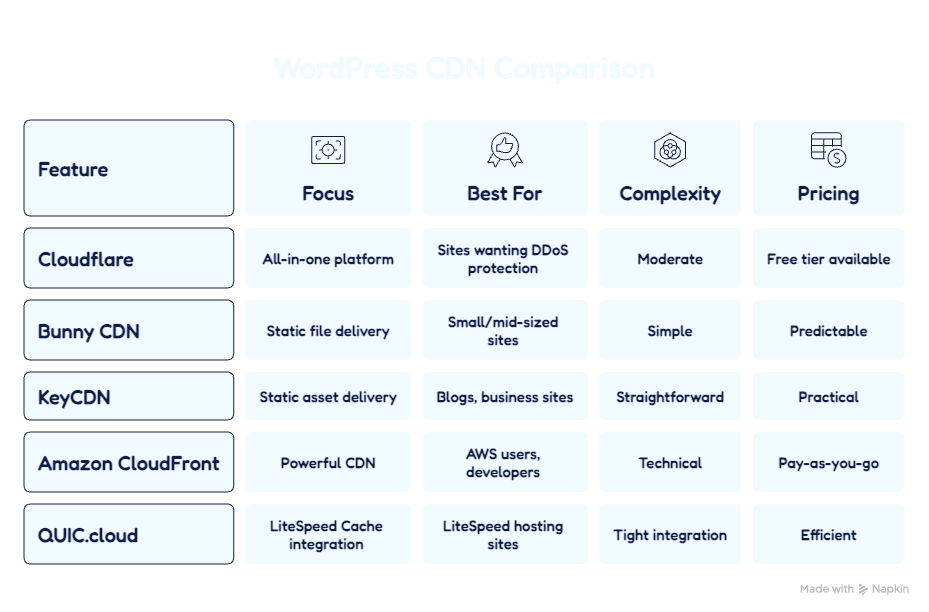
Cloudflare is one of the most popular CDN choices for WordPress because it combines global content delivery with DNS, SSL, and security features in one platform. It works well for sites that want faster delivery of static files and optional full-page caching with the right setup. It is a strong all-around option, especially for site owners who also want DDoS protection, bot controls, and easier traffic filtering.
Bunny CDN is a lightweight and affordable option that is especially good for serving images, CSS, JavaScript, fonts, and other static files quickly. It is often chosen by WordPress users who want a simple setup without the extra complexity of a large edge platform. For many small and mid-sized sites, it offers a strong balance of speed, ease of use, and predictable pricing.
KeyCDN is a straightforward CDN focused on fast static asset delivery and clean integration with WordPress caching plugins. It is a good fit for blogs, business sites, and media-heavy websites that want a traditional CDN without too many moving parts. Many users like it because it is simple to manage, easy to test, and practical for improving global file delivery.
Amazon CloudFront is a powerful CDN that fits best with WordPress sites already using AWS services such as S3, EC2, or other Amazon infrastructure. It offers strong global delivery and flexibility, but setup can feel more technical than beginner-friendly CDN tools. It is often a better fit for developers, custom environments, or growing sites with more advanced infrastructure needs.
QUIC.cloud is a CDN designed to work closely with LiteSpeed Cache, which makes it especially useful for WordPress sites on LiteSpeed hosting. It can improve asset delivery and works best when your site already uses the LiteSpeed ecosystem for caching and optimization. For those setups, it can be a very efficient choice with tighter integration than a more general-purpose CDN.
Do not choose a CDN only because the brand is familiar or the provider lists many locations. More locations do not always mean better performance for your audience. Choose based on the problem you need to solve:
The boring controls matter most in real use. A CDN that is fast but hard to debug will cost you time later.
CDN setup is manageable when you change one layer at a time.
Without a baseline, you cannot prove whether the CDN helped.
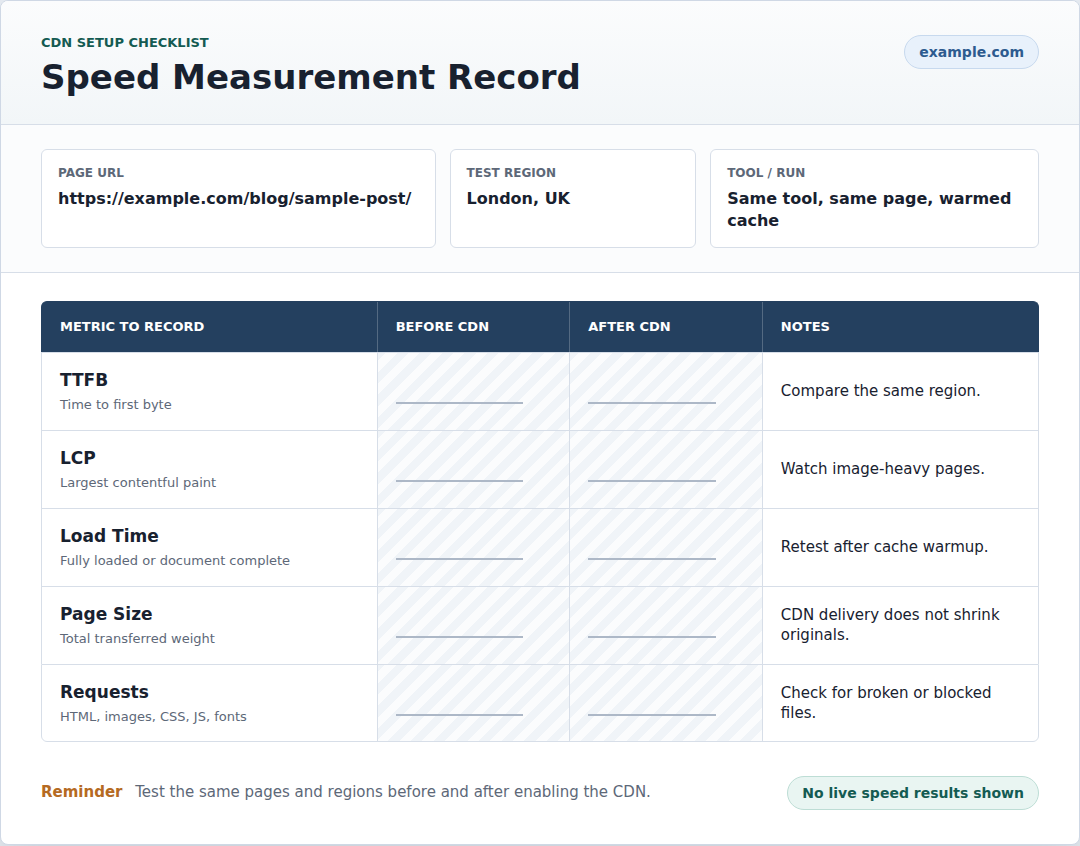
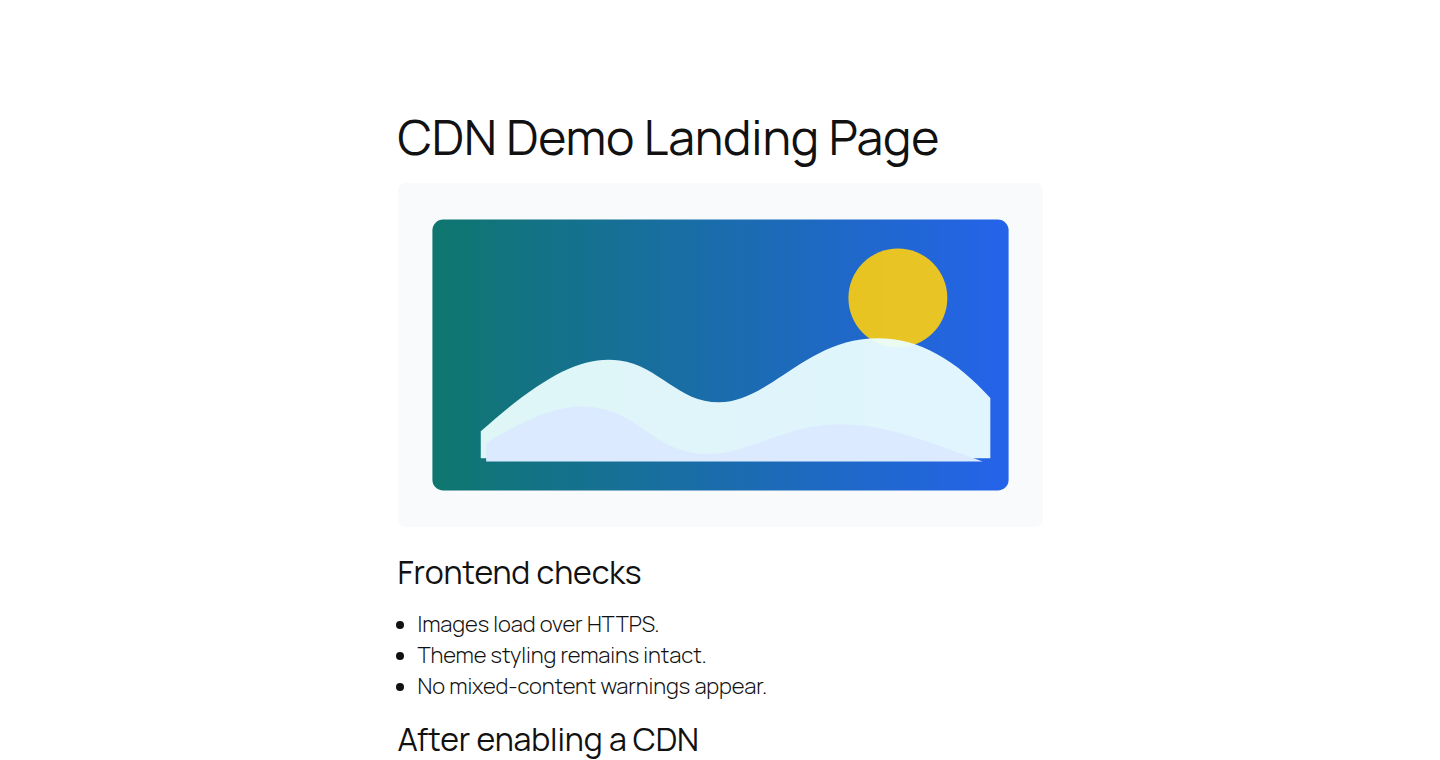
Use the same test tools, pages, and regions you used before setup. If you tested from Virginia and London before, test from Virginia and London after. Check:
Do not panic if the first test is mixed. A cold cache, wrong region, blocked asset, image optimizer conflict, duplicate CDN layer, or bad exclusion rule can hide the benefit.
The useful question is not “did the score go up?” The useful question is which requests got faster, which stayed slow, and why?
Most CDN failures come from using the right tool for the wrong job.
If a CDN makes things worse, turn off recent changes one layer at a time. Do not enable more optimization switches while you are still unsure what broke.
A CDN is worth testing when your WordPress site is slow because files travel too far, repeat requests overload the host, or static assets need faster delivery. It is not a cure for every slow site, and that is the most useful thing to know before you buy or enable one.
Start with measurement, not guesswork. If the CDN solves the delivery problem, keep it. If the site is still slow, look at WordPress itself: hosting, plugins, images, scripts, caching, and database work. That is how you speed up your WordPress site without adding another tool to the wrong problem.
Yes, when distance, static assets, bandwidth, or origin load are part of the slowdown. It helps most when visitors are far from your hosting server.
No. Your host still runs WordPress, PHP, the database, plugins, themes, admin, and original files. The CDN only delivers cached content faster.
Usually no. A basic CDN keeps cached copies for delivery, but your original media files still stay on your hosting account.
Do not aggressively cache admin, login, cart, checkout, account, membership, preview, personalized, or user-specific pages.
It may be enough for many small and mid-sized sites. Add another CDN only when you need better regional coverage, more cache control, stronger security features, image handling, analytics, or full-page edge caching.
Redis object cache sounds like one of those WordPress speed fixes you should just turn on and forget about. I get the appeal. When a site is slow, nobody wants a lecture about…
Read

Is your WordPress website loading slowly, but you are not sure what is causing the problem? Changing plugins, hosting, themes, or cache settings without clear evidence can waste…
Read

There is a very specific irritation in opening WordPress to make one small edit and then waiting on the dashboard like it’s thinking about whether you deserve access today. The…
Read
Airlift works out what each page needs and applies it. Free to try on your own site.